
All tools · Batch Converter
Batch Converter
Convert a whole folder to WebP, AVIF or optimised PNG at the quality you choose. Per-file or one ZIP, nothing uploaded.
Open Batch Converter →Free. No account needed.
- WebP, AVIF and lossless-optimised PNG, encoded in your browser with the Squoosh WebAssembly codecs
- One quality dial per batch, with the size saving shown live on every finished file
- Mix formats across drops: the format and quality lock in per image the moment you add it
- Download any single result or the whole batch as one ZIP, with no uploads and no per-image fees

Runs entirely in your browser. Your files never leave your machine.
See it in action
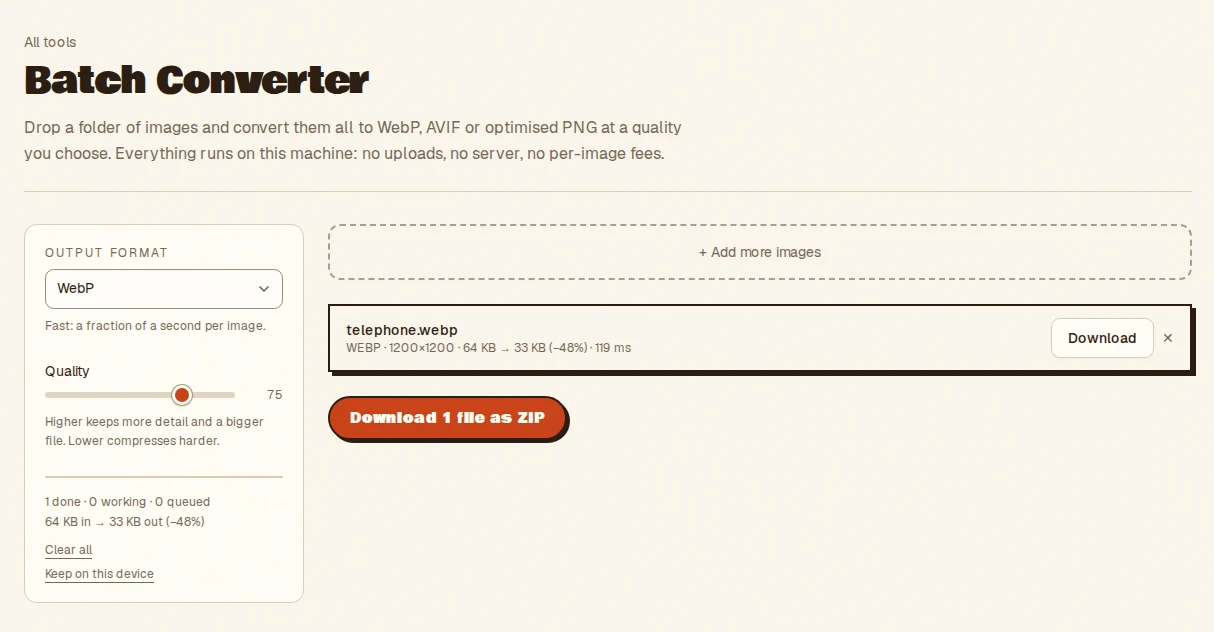
- Pick a format and quality
- Drop your images
- Download each file, or the batch as a ZIP
- Takes
- Browser-readable images, one or a batch.
- Gives
- WebP, AVIF or lossless-optimised PNG, single files or a ZIP. Encoded in your browser, nothing uploaded.
Batch Converter, answered
- Which formats does the Batch Converter output?
- WebP, AVIF and lossless-optimised PNG, encoded in your browser with the Squoosh WebAssembly codecs. Download files one at a time or as one ZIP.
- How do I choose the quality?
- One quality dial per batch. The size saving is shown live on every finished file so you can see what a setting costs before you commit to it.
- Can I mix formats in one batch?
- Yes. The format and quality lock in per image the moment you add it, so you can change the setting between drops.
- Are images uploaded to convert them?
- No. Everything runs inside your browser tab on your own machine. Nothing is uploaded and there is no server to send it to, so nothing is stored anywhere but your device.
More from the toolbox
Favicon Maker
Drop one logo, get the whole icon set: favicon.ico, apple-touch and PWA PNGs, a web manifest and a paste-ready snippet, all in one ZIP.
Have a look →
SVG Optimiser
Shrink a whole folder of SVGs with a safe svgo preset. viewBox and ids preserved, rendering untouched, byte savings shown per file.
Have a look →
Metadata Stripper
Strip location and camera data before a photo goes public.
Have a look →
Notes from the workbench
All comments ↗Used Batch Converter for something? Share what worked, or suggest one thing that would make it easier. Your note could help shape the next improvement.